
Monthly Archives: March 2011

Qt 4 C++ development with Qt 4 Creator or Netbeans on Ubuntu Linux

Qt logoSo you want to develop GUI applications using Qt4 framework on Ubuntu Linux? No problem. Everything what you need is at the tip of you fingertips (official Ubuntu repository to be exact). Here's what you need to do to have Qt 4 Assistant, Qt 4 Designer, Qt 4 Linguist and last but not least important Qt 4 Creator (following is all one line at the terminal):

sudo apt-get install build-essential qt4-designer qtcreator qtcreator-doc qt4-demos qt4-doc qt4-dev-tools libqt4-dev

Now feel free to go to Applications -> Programming -> Qt 4 Creator and do something creative.

Qt 4 C++ Netbeans development

But what if you want to use Netbeans to develop Qt 4 C++ applications? Piece of cake. Follow me... First step is to install Netbeans (you've probably guessed that one).

sudo apt-get install netbeans

Next step is to start Netbeans by going to the Applications -> Programming -> Netbeans. Netbeans is primarily Java IDE so we must make sure that Netbeans has C++ support plugin. So inside Netbeans interface we go to Tools -> Plugins and then switch to "Installed" tab. Here we must make sure that "C/C++" plugin is amongst installed plugins. If not, we switch to "Available plugins" tab and put checkbox next to "C/C++" plugin and click install at the bottom of the dialog. After "C/C++" plugin is installed along with it we acquired Qt 4 project support for Netbeans.

But there is one thing we must do before we start coding. We must tell Netbeans the path to the "qmake-qt4" program necessary to compile Qt 4 applications. We need to go to Tools -> Options and switch to the "C/C++" tab. Next to the "QMake Command" label we must enter path to the "qmake-gt4" program. If you are using Ubuntu Linux operating system you need to enter this path:

/usr/bin/qmake-qt4

Now click OK and find "Hello World" tutorial like this one. So here you go, now you have full blown Qt 4 development environment inside you Ubuntu box.
Webcam settings control on Ubuntu Linux operating system

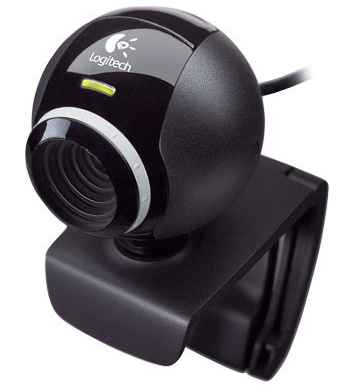
Logitech QuickCam E3500 Web CamIn the last few years the functionality cost of running Linux operating system shrunk. Good hardware support is one of the last things Linux is lacking when compared to other operating systems. That isn't really Linux community's fault. The hardware manufacturers are to blame for not supporting their own hardware on operating systems other than the proprietary ones. The Linux community developers are actually doing miracles with hardware support and I thank them on doing such a great work. Web cam support was once blind spot on Linux supported hardware list. But today we have Video4Linux video capture framework supported by UVC and GSPCA web cam drivers and most web cams are working happily on our Linux PCs.

It can be very confusing for someone who have just installed Ubuntu to discover that his web cam is working, but that he has no control over settings like brightness, contrast, auto exposure etc. Typical proprietary operating system user would use controls provided by web-cam drivers to adjust these settings. But we're not left out in the cold because Linux community provides means to control our web cams. Let me present applications I use on my Ubuntu PC with my Logitech E3500, Logitech E2500 and many other no-name web cams to adjust their video and other settings.

Continue reading

PHP Savant templating engine pagination class and plugins

I don't use Smarty templating engine for my PHP web projects. Why? I hate it. Why? I' familiar with PHP and I don't need to learn another markup language that takes away the power from PHP and imposes restrictions all the way. I'm not saying that without spending (non)quality time using Smarty (and loosing valuable time to learn it's unintuitive syntax).

For my web projects I mostly use PHP Savant customized to fulfill needs of the project at hand. What is PHP Savant? It's authors say that PHP Savant is a powerful but lightweight object-oriented template system for PHP. Savant does not compile your templates into PHP like Smarty, instead, it uses PHP itself as its template language. With PHP Savant you can write your page templates in pure PHP and you don't need to learn a new markup system. PHP Savant is great for developers because it is "complex" enough to be extremely useful, but at the same time simple enough to be easily modified without any special knowledge.

SavantPaginate

When it comes to PHP pagination, things can get quite messy. Pagination without templating engine is a nightmare and that's something to avoid at all costs. Even when you're using templating engine like PHP Savant things can get quite complicated without encapsulation of pagination logic in some kind of PHP class. Recently I made PHP Savant pagination class together with PHP Savant plugins for pagination, all for one of my recent projects for college. Today I'm my bringing PHP Savant pagination class and PHP Savant pagination plugins to you, all in a hope that you'll find it useful in your own web projects.

Instructions and download

You'll find instructions and download links by clicking on "SavantPaginate" at the top of TechyTalk.info or by clicking on the following link:

http://www.techytalk.info/other-projects/savantpaginate/

Ubuntu Netbeans and LAMP server with Xdebug as non-root user

In this article I'll show you how to setup Linux Apache Mysql PHP (LAMP) web development environment on Ubuntu Linux with your web site files in your home directory. This way you can easily develop for web as non-root user. If you are trying to install Linux Apache Mysql PHP on Windows, I'll point you to one of my previous articles where I have explained just that:

Apache, MySQL, PHP server on Windows

My goals for this session are to install Apache, MySQL and PHP with Xdebug module for PHP development debugging. We will setup Xdebug and use it with Netbeans, but once Xdebug is properly installed, you can debug your applications with any other application like Eclipse. The most important thing for a web developer or web programmer is to be able to easily modify his web development files without becoming root for everything he is working on. I will show you how to instruct Apache to make virtual host in your home directory. At the end of it all I will install Netbeans and create sample project to work with our new development environment. So lets get started...

Continue reading

Ubuntu latest Wacom tablet driver PPA

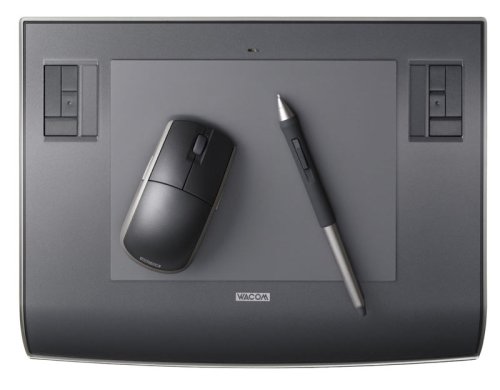
Wacom Intuos3 A5I use tablet instead of mouse. Why? It feels more natural when compared to mouse especially after you get used to it. And freehand drawing in Gimp becomes much easier and gives better results when you replace you mouse with tablet device. The only tablet manufacturer with good Linux support (provided by the community) is Wacom. Linux Wacom driver consists of kernel module and Xorg driver. Latest Wacom kernel module and Wacom Xorg driver can be found at Linux Wacom project Sourceforge site. It is very important for me to have my tablet in top shape on my Linux PCs so I often grab latest driver from projects Git repository and go trough process of compiling it. You might have some brand new Wacom tablet without support in your current Ubuntu distribution so you should do the same. Problem is that Git repository can sometimes be in semiusefull state because, after all it is the place where development is taking place.

Continue reading